eshaan-cli
A CLI that scaffolds React and Next apps and components, published on npm.
- Node.js
- CLI
- Inquirer
- COMMITS
- 24
- FIRST
- Jun 2023
- LAST
- Jul 2023
- ACTIVE MONTHS
- 2
eshaan-cli | A CLI Tool for Building React/Next Apps
eshaan-cli is a command-line interface (CLI) tool built with Node.js that helps streamline the process of building React/Next.js applications. It provides a simple and intuitive way to generate component templates, manage configuration settings, and customize file types and styling options.
Installation
To install eshaan-cli, use the following command:
npm install -g eshaanInitialization
To initialize the configuration for the eshaan-cli tool, enter the following command in your terminal:
eshaanOptions
-
Build component templates:
Input the names of the components cascadingly into the CLI, generating the necessary styling and tsx/jsx/js files, with their own folder.
eshaan componentName1 componentName2-
-config:
Display the config file for the current state of the CLI. This can be easily updated using the eshaan command.
-
-ts -js -jsx:
Set the file type for a single run of the eshaan CLI, without affecting the CLI's stored configuration. Perfect for changing the file type on the go for small alterations.
eshaan -ts componentName-
-ed -e:
Let's you choose between export default and export options, which also affects the indexify function, by appropriately importing and exporting the components
-
-scss -css -tailwind:
Set the styling type for a single run of the eshaan-CLI, without affecting the CLI's stored configuration.
-
in::
Create the components in a particular directory, within the app root, or the src folder, as stated by the config.json file.
eshaan in:components component1 component2-
-indexify:
Create the necessary indexes of the CLI components within the directory. This enables easy importing and exporting of React components.
eshaan in:layout navbar footer section -indexify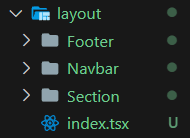
Fig 1. Directory structure of the components
Example of index.js file after using -indexify option:
import Footer from "./Footer/Footer";
import Navbar from "./Navbar/Navbar";
import Section from "./Section/Section";

export { Footer, Navbar, Section };
Examples

Fig 2. Initializing the configurations

Fig 3. Creating multiple components at once

Fig 4. Specifying directory name for the creation of components

Fig 5. Using -indexify creates an index file for easy import and export
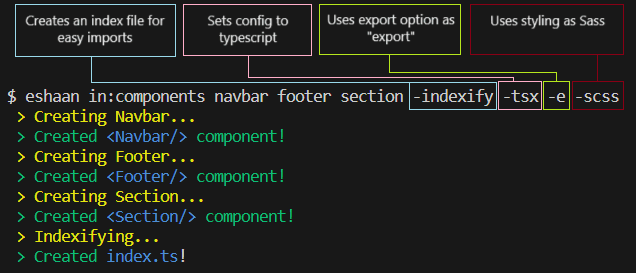
*Fig 6. using `-ts` and `-scss` creates the components with this config, but resets on the next call*
HEAD · 434640a0 FOLDERS · 6 FILES
- .gitignorefirst commitJun 2023
- eshaancompressed to a single index fileJul 2023
- index.jsbug fix config fileJul 2023
- package-lock.jsonbug fix config fileJul 2023
- package.jsonupdated versionJul 2023
- README.mdUpdate README.mdJul 2023
Showing the top two levels. Files aren't browsable: this is a portfolio, not a mirror.
24 COMMITS · 1 AUTHOR
WED, JUL 26 20233 COMMITS
- 434640aUpdate README.mdEYJul 2023Jul 2023
- 2b08becUpdate README.mdEYJul 2023Jul 2023
- de8c729Update README.mdEYJul 2023Jul 2023
MON, JUL 3 20233 COMMITS
- 0772269updated versionEYJul 2023Jul 2023
- f493ac6bug fix config fileEYJul 2023Jul 2023
- d7e0c4dcompressed to a single index fileEYJul 2023Jul 2023
WED, JUN 28 202313 COMMITS
- f9e2d50Update README.mdEYJun 2023Jun 2023
- dd48a01Update README.mdEYJun 2023Jun 2023
- 601fcdaUpdate README.mdEYJun 2023Jun 2023
- 3b7c583fixed bugs, added export optionsEYJun 2023Jun 2023
- 9e2b87dfixed indexify for tsx and jsxEYJun 2023Jun 2023
- 1095c93v upgradeEYJun 2023Jun 2023
- a7bed4efixed for tailwind and tsEYJun 2023Jun 2023
- 1e1d5f3Update README.mdEYJun 2023Jun 2023
- 1668aecsupport for ts indexEYJun 2023Jun 2023
- de0befaUpdate README.mdEYJun 2023Jun 2023
- e2ac3a7Update README.mdEYJun 2023Jun 2023
- 16c2190ts index updatedEYJun 2023Jun 2023
- 2134458Update README.mdEYJun 2023Jun 2023
TUE, JUN 27 20235 COMMITS
- 537bda6Update README.mdEYJun 2023Jun 2023
- ba3c80cadded support for typescript, refactorsEYJun 2023Jun 2023
- 37c0740Update README.mdEYJun 2023Jun 2023
- 3a0fb3bCreate README.mdEYJun 2023Jun 2023
- ab1df93first commitEYJun 2023Jun 2023
That's every commit.